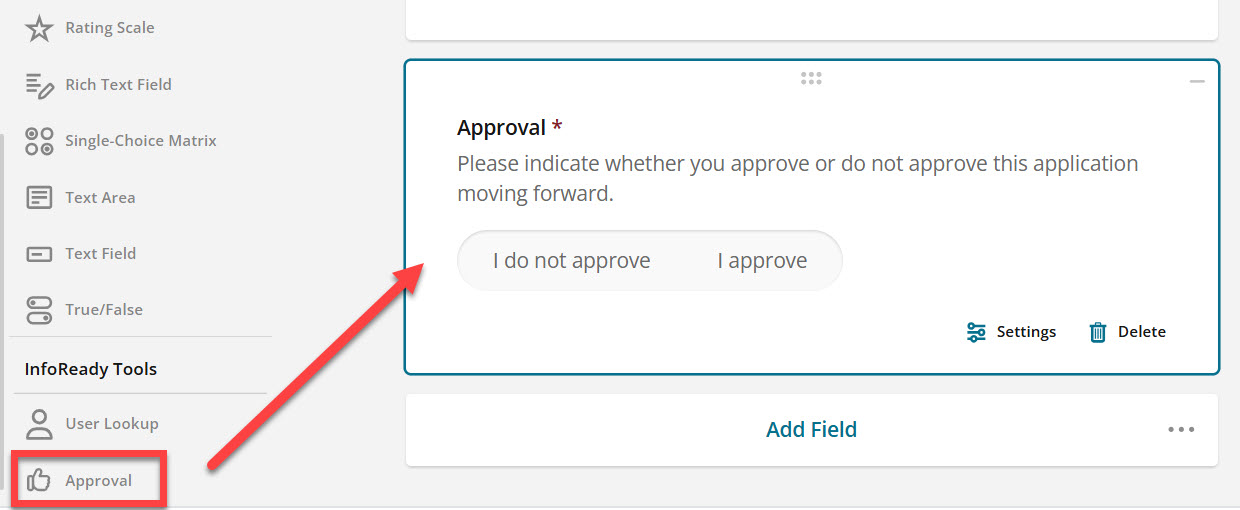
For each Review routing step, Administrators will see an Approval option in the InfoReady Tools section of the toolbar:
Key Points
- Administrators can place the tool anywhere on the form.
- Admins can customize the language on the label, instructions, and response choices to match the terminology used by your review process.
- Only one Approval can be added per routing step. If you need to collect multiple Yes/No decisions, consider using standard Yes/No questions for the additional responses.
- If it is used, all reviewers must fill it out, i.e., you cannot use conditional logic to make it optional.
- There is currently no business logic with this tool. It will function the same as a standard "Yes/No" question and Admins can take manual action on applications based on the responses.
Frequently Asked Questions
Can you add additional choices to the Approval Tool?
No, this Approval Tool is a true or false (Yes/No) question type, only the two responses are available.
Does the Approval tool automatically approve or reject an application?
No. The Approval tool does not currently include business logic or automatically change an application's status based on the response. It functions similarly to a standard Yes/No question. Administrators must review the responses and take any necessary action manually.
What happens when reviewers select different responses?
The Approval tool simply records each reviewer's response. It does not automatically determine the application's outcome if reviewers disagree. Administrators can review the responses and make the appropriate decision manually.
Have more questions about this topic? Go to the Community Forum to pose the question to other users or submit a support ticket to InfoReady.