This is an optional configuration not enabled by default. If you would like to enable it on your site, contact your Implementation Specialist or submit a ticket to our Support Team.Overview
In addition to Categories, Cycles, and Academic Years, you may want to set up Keywords separately for your site. This setting:
- Can be contextualized to support any term configuration: Subject, Discipline, etc.
- Is a list that can be added to and edited from the Details page of a competition or from the Admin tab > Configure Platform section by top-level Administrators (i.e., Super Admins on tenants without microsites, Global Admins on tenants with microsites).
- Is optional for all competitions by default but can be set up as a required field.
- Appears below Category on the Details page of any competition.
- Shows in sitewide Excel reports.
Adding and Selecting Keywords
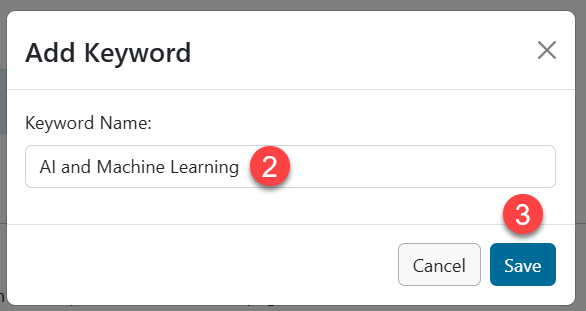
- 1 - Click the Add Keyword button to add a new keyword.
- 2- Type in the term. Each term must be 100 characters or less.
- 3 - Click Save.
Repeat as needed to configure additional keywords.
Have more questions about this topic? Go to the Community Forum to pose the question to other users or submit a support ticket to InfoReady.