When setting up an opportunity, InfoReady allows administrators to choose to open the application:
- upon launch (default)
- on a specific date and time
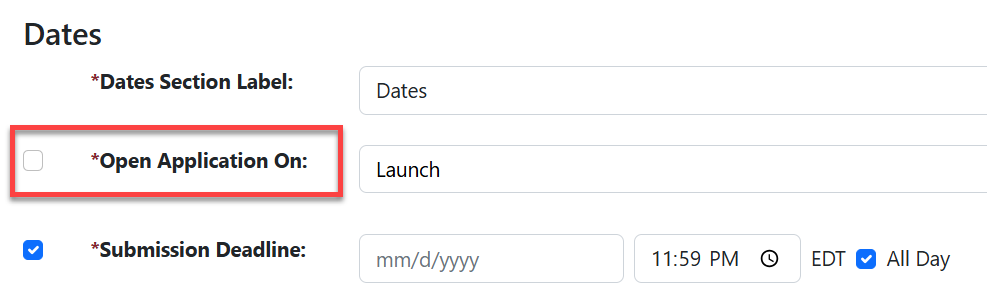
Upon Launch
- Once you complete the configuration process and select Finalize > Launch, the application will also open.
- Because this date is the same as the launch date, it does not show to applicants by default. Check the box next to "Open Application On:" to display the date to potential applicants.
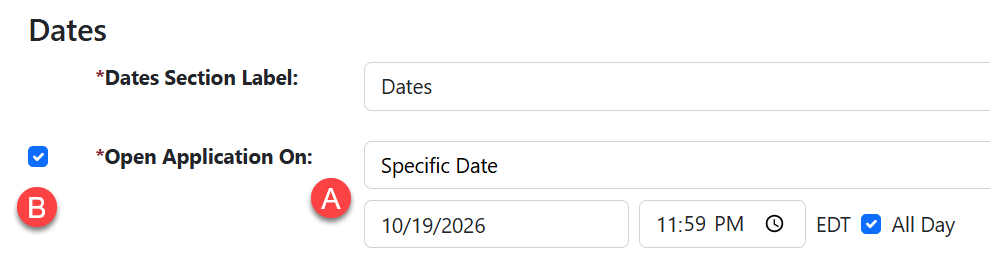
On a Specific Date
- Choose any future date and time to launch the application (A). This controls when the Apply button appears to applicants so they can start the submission process.
- By default, this date will display to potential applicants but you can uncheck the "Open Application On:" box to hide it.
IMPORTANT: The Open Date does not, by itself, make an opportunity available.
The Apply button will appear on the Home Page only after both the Open Date and Open Time have passed.
If the Apply button is missing on the Open Date, check the Open Time configured for the opportunity. If the time has not yet passed, the Apply button will not appear.
Have more questions about this topic? Go to the Community Forum to pose the question to other users or submit a support ticket to InfoReady.