Would you like to keep certain application data private during the submission process but still be able to report on it later? Do you need to share information with reviewers but not applicants?
Important Notes
- Some fields cannot be hidden from applicants, including First Name, Last Name, Application Title.
- InfoReady Tools Applicant-Driven Routing Steps, Co-Applicants, Reference Letters, and Electronic Signatures also cannot be hidden.
- After creating the fields, administrators can edit applications to fill out fields or upload files on the relevant application(s).
- Hidden fields only appear on application PDFs if downloaded by an administrator. If downloaded by the applicant, the fields will not be included.
Potential Uses
- Comment box for admins to share notes with reviewers (shown below)
- Academic stats like GPA, Class Standing, etc. that applicants should not be entering on their own
- Post-submission info or file uploads that admins enter before assigning to reviewers
Administrator Set Up
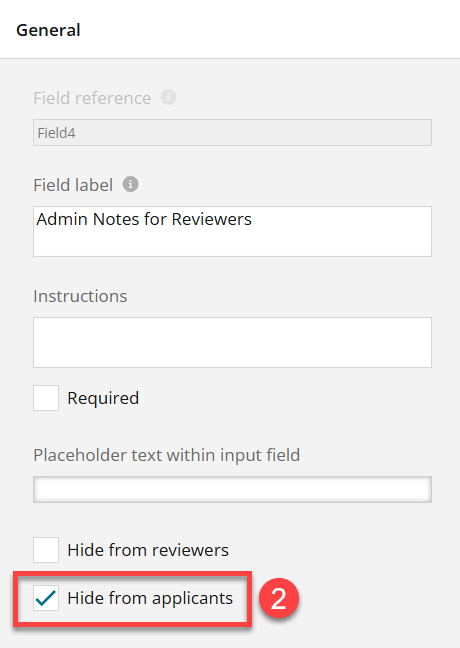
Hide a field by opening the Settings panel of the question and checking the Hide from Applicants box: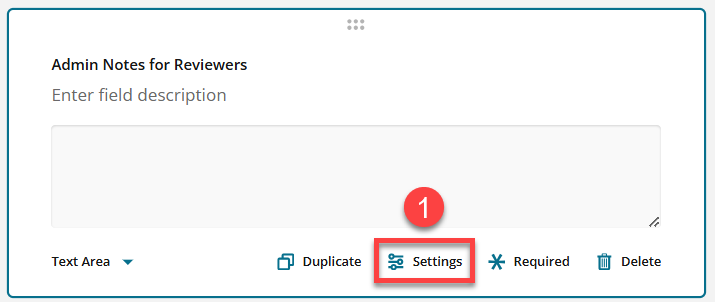
Hiding fields from applicant is a Form Designer Pro feature. For more information, contact your account manager or view this article: Form Designer Template: Core vs. Pro Comparison Chart
Have more questions about this topic? Go to the Community Forum to pose the question to other users or submit a support ticket to InfoReady.